Let’s talk ↗

MODELS. DATA. A NEW PERSPECTIVE.

See the whole picture.
Decide with context.

01 — 09

Which equipment needs attention? Where did work stall? What are your data not yet showing?

GESTALT turns models, asset records and scattered files into a view built around your work. For operational teams and CAD/BIM partners: start with one useful workflow, in the sector you know.

Explore the interactive examples ↓

GESTALT STUDIO

From scattered data to the next decision.

Enable JavaScript to explore 3D models, histories and asset records. Service information and contact links remain available on this page.

YOUR CONTEXT / OUR STARTING POINT

Different sectors.
A useful connection.

The scenes above illustrate ways to use connected information. Your project starts with your workflow and the people using it, rather than a fixed industry template.

01 / OPERATIONAL TEAMS

Find the asset.
See what needs attention.

A pump, a work area or a storage zone can bring together its status, records and documents. Your team spends less effort reconstructing context before deciding what to check.

YOU BRING
Your assets, files and operational question
WE PREPARE
A shared view with traceable information
Plan a view for my team ↗

02 / CAD & BIM PARTNERS

Give the model
an information handover.

Extend an agreed model delivery with asset records, documents and a browser interface for your client. We can also prepare CAD geometry and exchange files as a separate service.

YOU BRING
An approved model or export, asset IDs and requirements
WE PREPARE
Prepared files or a visual handover, as scoped
Discuss a partner delivery ↗

File compatibility, ownership, permissions and required native formats are checked before quoting. Inventor, AutoCAD, Civil 3D and Blender are available according to scope; Revit authoring is not included in this offer.

01 / FROM YOUR WORLD TO THE SCREEN

You provide the context.
We connect the parts.

A digital twin connects a digital representation with information about the real world. It can begin with approved files and manual updates. Automated connections are added when the sources, access and business case support them.

01 / YOU PROVIDE

Your project’s starting point

An existing model or drawings, asset IDs, files and a question your team needs to answer. You provide the operational context and confirm the source information.

02 / GESTALT

Organisation + model + data

We check compatibility, prepare agreed geometry, organise asset records and connect the information. Indicators, permissions and update methods are defined together.

03 / YOU USE

A working view

A browser view with clickable assets, indicators and documents, plus the agreed files and a handover session. Your team checks the first delivery against written acceptance criteria.

TOOLS, DEPENDING ON SCOPEInventorAutoCADCivil 3DBlenderWeb + data

A PRACTICAL FIRST DELIVERY

Start small.
Make it useful.

A defined pilot lets your team try one workflow with its own information before deciding what to expand. This is an example starting scope, confirmed only after reviewing your files.

Discuss this first step ↗

EXAMPLE PILOT / AGREED DELIVERABLES

  • One usable model or defined area, supplied by you
  • Up to 25 identified assets with linked records
  • One agreed CSV source with manual updates
  • Up to 3 indicators with defined calculations
  • One consolidated revision and a handover session

You can locate agreed assets, open their records and verify indicators against the supplied CSV. Those checks become the pilot’s acceptance criteria.

New or complex geometry, file remediation, APIs, live telemetry and extra revisions are scoped separately. Hosting, access requirements and optional monthly care are agreed in the proposal.

02 / CONNECTIONS WITH A PURPOSE

Your process goes beyond
the last spreadsheet.

Production in one system. Maintenance in another. Reference prices in a third. We bring relevant sources into a shared view, with their origin and update time identified.

Working with natural gas and following Brent? We can assess an authorised source and bring that reference into your dashboard alongside plant data. Brent provides market context; it is not a measure of your gas price.

Connections depend on access, data quality and licences. Paid APIs and sensor purchases are agreed separately.

YOUR INTEGRATED VIEWFICTIONAL EXAMPLE
Production / period1,240 Nm³Source: demonstration CSV
Open tasks03 itemsSource: demonstration list

Enable Brent to try an external source in the same view.

03 / DATA ANALYSIS

Understand what changed.
Investigate what matters.

You can also commission data analysis without a 3D model. We organise files, build indicators and deliver a clear interpretation with explicit assumptions and limitations.

SIMULATED DATA

Illustrative examples. An indicator points to where to investigate; it does not establish a cause on its own or guarantee savings.

APPLIED INTELLIGENCE / MACHINE LEARNING

Your history can reveal
what deserves attention.

A model can help estimate demand, classify records or flag unusual behaviour. Value comes from testing a useful hypothesis with your data — and measuring whether it works beyond the training sample.

Assess an idea using my data ↗
HOW A PROJECT PROGRESSESML / 01
  1. 01
    Data and a question

    History, objective and data quality. We identify gaps before promising a forecast.

  2. 02
    Model and comparison

    We compare the model with a simple baseline. Added complexity only makes sense when evaluation improves.

  3. 03
    Validation and use

    Results on separate data, documented metrics and limitations. Once deployed, a model needs monitoring.

Feasibility and performance depend on the data. Accuracy, failure prediction and financial returns are not guaranteed.

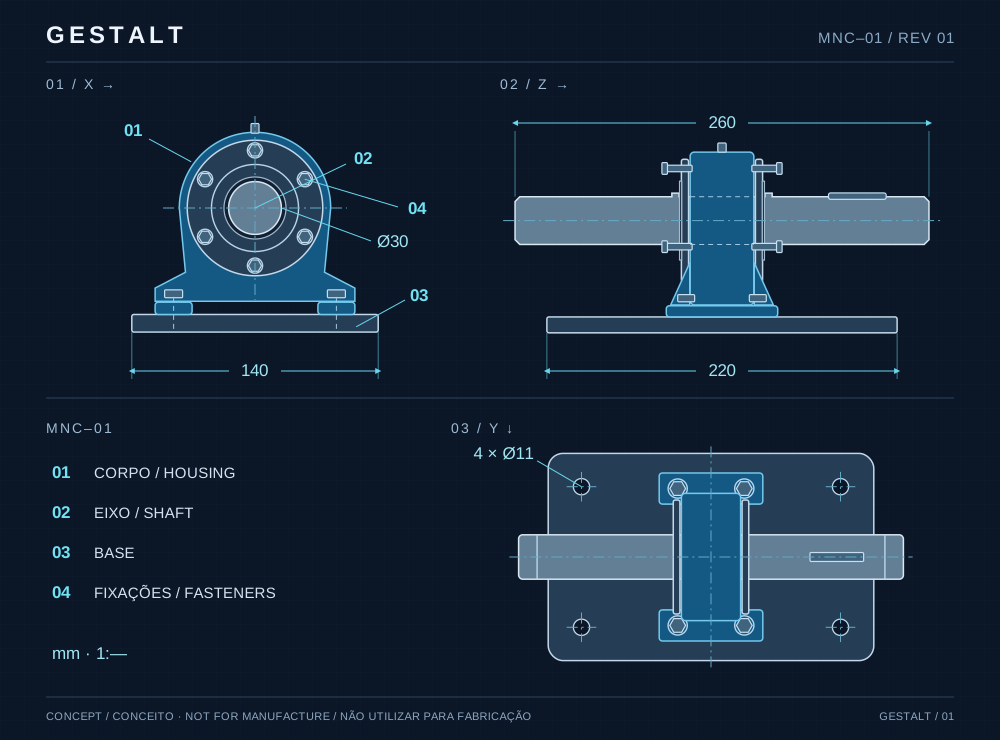
Conceptual bearing assembly drawing with three views and reference dimensions

Bearing assembly · conceptual drawing · dimensions for illustration

Explore a conceptual part ↗

04 / 3D MODELLING IN INVENTOR

Your component.
Clearly defined in 3D.

Parts, brackets, scaffolding components and assemblies modelled in Autodesk Inventor from your references. An independent service: commission modelling and documentation alone, without a digital twin or a monthly operating fee.

  • Input: your sketches, dimensions, drawings and requirements.
  • Delivery: parts and assemblies, views and native or exchange formats, as scoped.
  • Use: communicate details, organise components and review geometry before the next steps.

The browser example demonstrates geometry and was not created in Inventor. The contracted tool and files are specified in the proposal. Design calculations, scaffolding loads and manufacturing validation require specific technical responsibility.

05 / FOUR SERVICES. ONE CLEAR PURPOSE.

Choose what you need.
Connect when it makes sense.

Four services you can commission independently. Choose a clear first delivery; add another service when the workflow calls for it. Sector knowledge comes from working with your team, your references and your technical specialists.

Machine Learning

Explore demand forecasts, record classification and anomaly detection using historical data. First we assess whether the data can support your question, then compare and validate the model.

FEASIBILITY + SCOPED PROJECT
⌁

Data Analysis

Turn spreadsheets and records into dependable indicators, charts and reports. Understand changes, compare periods and bring better questions to your operation.

PROJECT OR RECURRING SERVICE
⬡

3D Modelling · Inventor

Parts, scaffolding components and assemblies in Inventor, based on approved references. CAD preparation and exchange files for CAD/BIM partners are assessed for compatibility and quoted separately from digital twin operation.

QUOTED BY SCOPE
◈

Custom digital twin

An interface tailored to your assets and decisions: a model, linked records, indicators and documents. For your own operation or as an agreed delivery for your CAD/BIM client. Start with existing information and a defined first area.

SETUP + MONTHLY SERVICE
HOW THE MONTHLY SERVICE WORKS

Building is one stage.
Keeping it running is another.

Setup pays for the initial delivery. Monthly care pays for the agreed hosting and ongoing work. The proposal states what is included, how much support time is reserved and which services are billed separately.

  1. 01

    Definition and setup

    We review sample files, define one useful workflow and document deliverables, acceptance criteria, revisions and milestones. Price and timing are confirmed after that review.

  2. 02

    Monthly operation

    Your plan specifies the environment, hosting budget, maintained connections, update frequency, backup arrangements and included support hours. Human service windows and response targets are agreed in writing.

  3. 03

    Changes and continuity

    New areas, features, integrations and work beyond the allowance are quoted before execution. Third-party charges, data export, deliverable files and termination arrangements are stated upfront.

Matheus, founder of GESTALT
THE PERSON BEHIND GESTALT

Matheus Lara

GESTALT founder · Mechanical Engineering student

Direct communication.
Transparent scope.

You work directly with Matheus to turn a specific need into a documented delivery. GESTALT supports operational teams and CAD/BIM companies with modelling, data analysis, Machine Learning studies and custom digital twins, independently or in combination.

These examples were created to demonstrate possibilities. They are not client projects or evidence of commercial results. Safety systems, equipment control and regulated technical projects require specific scope and qualified professionals.

06 / BEFORE WE START

Practical questions.

Do I need sensors or an existing 3D model?

You can start with files and manual updates. The example pilot on this page uses an existing usable model; creating geometry or preparing incompatible files requires its own scope. Sensor connections require compatible equipment, access and data.

Is it really updated in real time?

Only when the source and architecture allow it. Updates can be manual, hourly or at another agreed interval. Each connection should display its last update and handle failures. The examples on this site are simulated.

How does 24/7 support work?

You can submit requests at any time, every day. Your plan defines reserved support hours, human service windows, response targets and how extra work is approved. Continuous monitoring or dedicated on-call cover requires a separate agreement.

How much does it cost and how long does it take?

That depends on the model, sources, users and update frequency. After understanding the objective and reviewing sample files, we provide a proposal with setup, any monthly fee, milestones and exclusions. Timelines are confirmed only after that assessment.

How is my company’s data handled?

Access, storage, permissions, backups and deletion are defined before deployment. We request only what the project needs. This demonstration site does not request files or credentials; please do not send confidential data in your first message.

Does the monthly fee cover every change?

The monthly plan covers the hosting and care allowance listed in your proposal. Extra hours, a new area or a new connector need approval and a separate quote. Export and termination terms are agreed before engagement.

YOUR NEXT STEP

Start with one
practical improvement.

Tell us what your team needs to see, what information already exists and the first decision this should support. Use the short brief to prepare your email, or contact Matheus directly. We review feasibility before committing to scope, price and timing.

Email Matheus directly ↗matheus@gestaltdigitaltwins.comThis button opens your email application. No message is sent automatically.

A SHORT PROJECT BRIEF

What would make your work easier?

Prepare a clear first message. No files, accounts or confidential information needed.

For example: locate a pump and see its latest inspection. Up to 320 characters; do not include sensitive details.
Your answers stay on this page while you prepare the draft. They are not stored or sent by this website. You choose whether to open your email app and send the message.
Requests welcome 24/7 · Human service windows and included support hours agreed in your plan.